
What Are Microsoft Copilot APIs?
Microsoft 365 Copilot APIs are REST-based APIs exposed through Microsoft Graph that deliver AI-powered reasoning over your organizational data. Unlike standard Graph APIs that handle CRUD operations, these APIs provide semantic understanding — intelligent search, AI-generated meeting summaries, and conversational experiences grounded in your Microsoft 365 content.
The key advantage? Everything runs in-place. Your data stays where it is, existing permissions and sensitivity labels are respected, and you get production-grade AI without building infrastructure from scratch.
Why Copilot APIs Instead of Building Your Own?
| Aspect | Custom AI Solution | Copilot APIs |
|---|---|---|
| Data Security | Must build extraction and indexing pipelines | Works in-place with existing permissions |
| Compliance | Manage separate compliance controls | Inherits Microsoft 365 compliance features |
| AI Infrastructure | Must maintain language models and infrastructure | Production-grade AI included |
| Time to Market | Months of development | Weeks or days |
| Cost of Ownership | High (data pipelines, indexing, storage, models) | Lower (API consumption based) |
Licensing Requirements
Before we get into the APIs, let’s address the elephant in the room — licensing. Every user accessing Copilot APIs needs:
- Microsoft 365 Copilot license — non-negotiable, provides the underlying AI capabilities
- Microsoft 365 E3 or E5 (or equivalent) — the foundation for your Microsoft 365 data
Standard Microsoft Graph APIs work with regular M365 licenses. Copilot APIs require the dedicated Copilot license because they deliver AI-powered capabilities on top of your data.
The Copilot APIs at a Glance
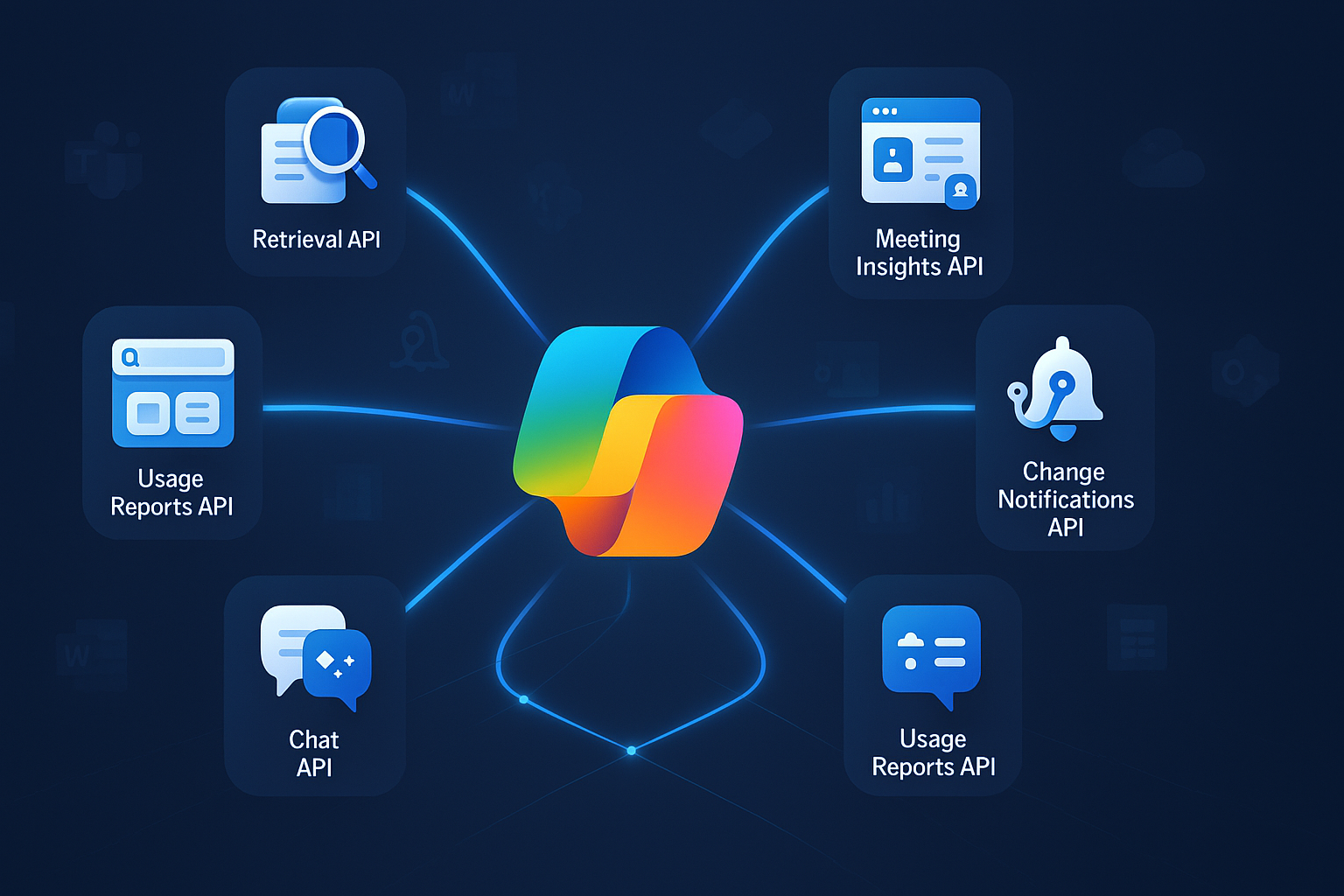
Microsoft provides several Copilot APIs. Here are the six we’ll cover in this post:
| API | Purpose | Status |
|---|---|---|
| Retrieval API | RAG with semantic search across SharePoint, OneDrive, Connectors | GA |
| Search API | Hybrid semantic + lexical search over OneDrive | Preview |
| Meeting Insights | AI-generated summaries & action items from Teams meetings | GA |
| Change Notifications | Real-time webhooks for Copilot interaction events | Preview |
| Chat API | Embed Copilot conversations in your apps | Preview |
| Usage Reports | Per-user Copilot adoption monitoring across M365 apps | Preview |
See it in action
I built an SPFx sample — Copilot API Explorer that demonstrates Chat, Search, Meeting Insights, and Usage Reports through a tabbed web part. All code examples in this post follow the same patterns.
1. Retrieval API - Grounding Your AI with Enterprise Knowledge 🔍
The Retrieval API is your gateway to building Retrieval-Augmented Generation (RAG) applications grounded in enterprise data. Instead of extracting data to external indexes, this API retrieves relevant context directly from SharePoint, OneDrive, and Copilot connectors — all while respecting security and compliance controls.
Think of it as a smart search engine that understands intent, not just keywords.
Real-World Example: A consulting firm needs to prepare client briefings. Instead of manually searching SharePoint, they use the Retrieval API to surface relevant documents, case studies, and precedents based on natural language queries — with information barriers between competing clients fully enforced.
When to Use It
- Custom knowledge apps that answer questions from your organization’s documentation and policies
- Multi-source RAG systems combining SharePoint, OneDrive, and connector data into a unified knowledge base
- Finance & legal search requiring precision filtering with information barrier support
Prerequisites & Permissions
Prerequisites
Microsoft 365 Copilot license, M365 E3/E5, and semantic indexing enabled (automatic for most tenants).
| Permission | Scope | Data Source |
|---|---|---|
Files.Read.All |
Delegated, Application | SharePoint, OneDrive |
Sites.Read.All |
Delegated, Application | SharePoint |
ExternalItem.Read.All |
Application only | Copilot connectors |
Implementation
import { MSGraphClientFactory, MSGraphClientV3 } from "@microsoft/sp-http"; |
Limitations & Tips
- Query string limited to 1,500 characters — keep queries focused and context-rich
- Maximum 25 results per request, 200 requests/user/hour throttle
- Only text content is indexed — images, charts, and nontextual content not supported
- Files over 512 MB (
.docx,.pptx,.pdf) or 150 MB (other types) are skipped - Semantic retrieval supports:
.doc,.docx,.pptx,.pdf,.aspx,.one - Send all returned extracts to your LLM for answer generation — don’t cherry-pick
- The Retrieval API also supports pay-as-you-go pricing (preview) for tenant-level data sources, so you don’t need to license every user
2. Search API — Natural Language Document Discovery 🔎
While the Retrieval API excels at grounding AI responses, the Search API is built for document discovery. It performs hybrid search (semantic + lexical) across OneDrive content, enabling natural language queries that understand context and intent.
Users no longer need to remember exact filenames — they describe what they’re looking for naturally.
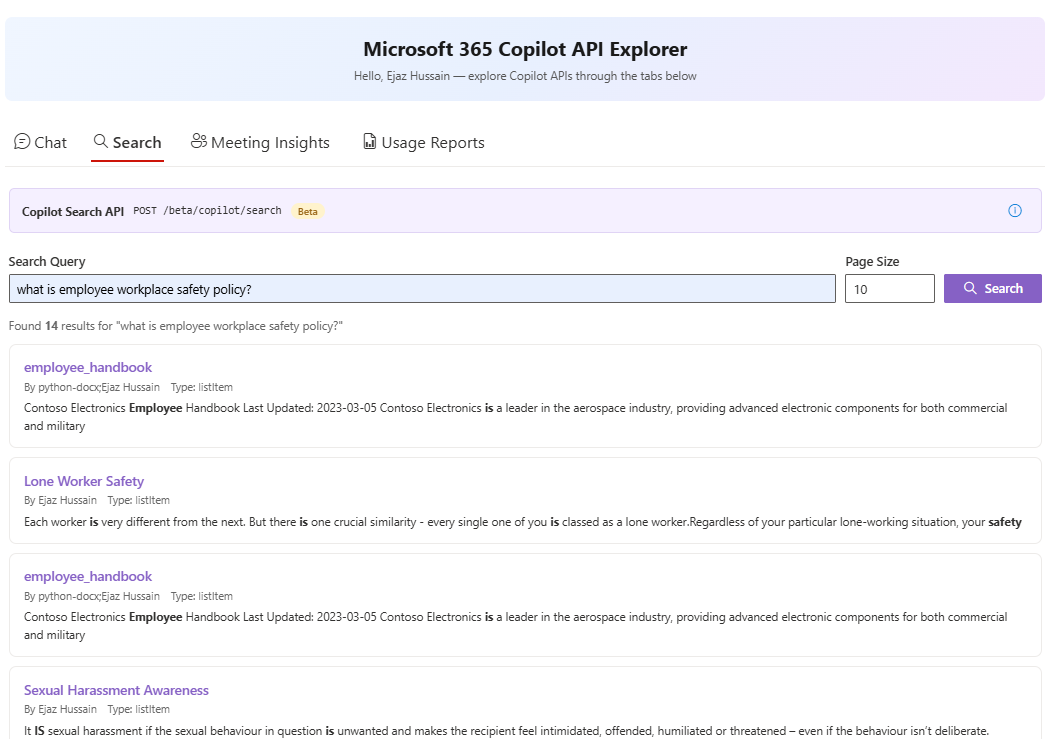
Practical Example: A financial analyst searches for “Q4 budget forecasts we discussed last month.” The Search API understands the intent and returns budget-related documents modified in that timeframe — no exact filename needed.
When to Use It
- AI-powered search experiences with natural language understanding in portals and apps
- Document discovery — help users find the right file based on descriptions, not keywords
- Enterprise search that understands context and intent
Prerequisites & Permissions
Prerequisites
Microsoft 365 Copilot license. Currently limited to OneDrive for work or school (SharePoint and other sources coming in future releases).
| Permission | Scope | Purpose |
|---|---|---|
Files.Read.All |
Delegated, Application | Read OneDrive file metadata and content |
Sites.Read.All |
Delegated, Application | Access OneDrive storage permissions |
Implementation
import { MSGraphClientFactory, MSGraphClientV3 } from "@microsoft/sp-http"; |
Source Code
For a full React implementation with search UI, see the CopilotSearchTab in our SPFx sample.
Limitations & Tips
- Query limited to 1,500 characters, page size up to 100 results
- Only OneDrive content supported today (SharePoint coming soon)
- Only
pathexpressions supported in filters (more KQL properties coming) - 200 requests/user/hour throttle
- Results come from the user’s personalized working set — not all OneDrive content
- Use natural language, descriptive queries for best results
3. Meeting Insights API — Turning Meetings into Action 📋
Teams meetings generate valuable context, decisions, and action items. The Meeting Insights API automatically extracts AI-generated summaries, action items, and discussion topics — no manual note-taking required.
This is the API that transforms meetings from time spent to value created.
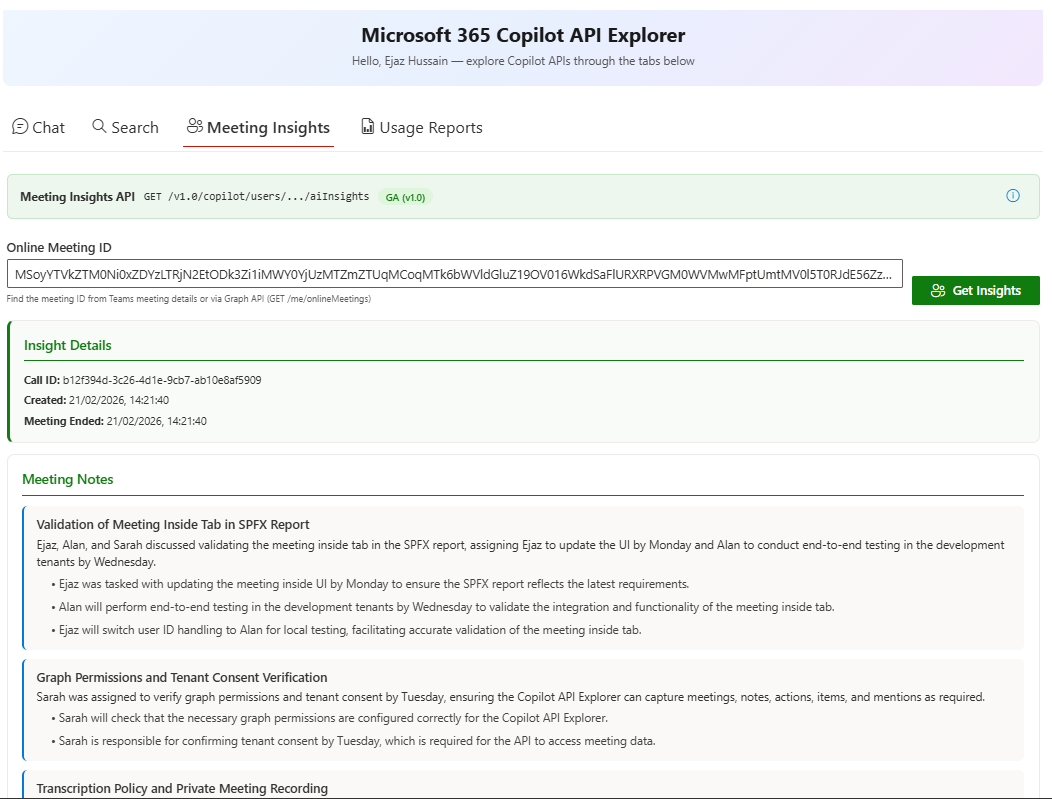
Real-World Example: A sales team conducts customer calls. After each meeting, the API extracts call summaries, action items with assigned owners, and mentions of budget, timeline, or stakeholders — all automatically logged into Salesforce.
When to Use It
- CRM integration — auto-populate meeting summaries and follow-ups in Salesforce, HubSpot, or Dynamics
- Project management — extract action items into Azure DevOps, Jira, or Monday.com
- Compliance & auditing — archive meeting insights for regulated industries
Prerequisites & Permissions
Prerequisites
Microsoft 365 Copilot license and a Teams meeting with transcription or recording enabled. Insights become available up to 4 hours after the meeting ends.
Important Note
Private scheduled meetings, town halls, webinars, and Meet Now are supported. Channel meetings are not yet supported.
| Permission | Scope | Purpose |
|---|---|---|
OnlineMeetingAiInsight.Read.All |
Delegated, Application | Read AI-generated insights |
OnlineMeetingTranscript.Read.All |
Delegated, Application | Read meeting transcripts |
Implementation
There’s an important nuance here — the list endpoint may only return insight IDs without the detailed content. You need to check and make a second call to get the full notes, action items, and mentions:
import { MSGraphClientFactory, MSGraphClientV3 } from "@microsoft/sp-http"; |
Source Code
For a complete React component with loading states and error handling, see the MeetingInsightsTab in our SPFx sample.
Limitations & Tips
- Insights are not real-time — available only after the meeting ends (up to 4-hour delay)
- Channel meetings are not yet supported
- Requires transcription or recording to be enabled during the meeting
- AI-generated content may need human validation for critical decisions
4. Change Notifications API — Real-Time Compliance Monitoring 🔔
The Change Notifications API lets you subscribe to Copilot interactions and receive real-time webhooks whenever users query Copilot or receive responses. This is essential for compliance, auditing, and understanding AI usage patterns across your organization.
Instead of polling for interactions, notifications come to you as they happen.
When to Use It
- Compliance & auditing — capture all Copilot interactions for HIPAA, SOX, or GDPR
- Anomaly detection — monitor for unusual usage patterns or sensitive queries
- Usage analytics — build dashboards showing Copilot adoption trends by department
Prerequisites & Permissions
Prerequisites
Microsoft 365 Copilot license, an HTTPS webhook endpoint with a valid SSL certificate, and an encryption certificate for encrypted payloads.
User-scoped subscriptions:
| Permission | Scope | Purpose |
|---|---|---|
AiEnterpriseInteraction.Read |
Delegated | Subscribe to user’s own interactions |
AiEnterpriseInteraction.Read.User |
Application (RSC)* | Subscribe to a specific user’s interactions |
AiEnterpriseInteraction.Read.All |
Application | Subscribe to all interactions for a user |
Tenant-scoped subscriptions:
| Permission | Scope | Purpose |
|---|---|---|
AiEnterpriseInteraction.Read.All |
Application | Subscribe to all tenant interactions |
*RSC = Resource-Specific Consent. Requires Teams app manifest configuration.
Implementation
Subscribe to a specific user’s Copilot interactions:
import { MSGraphClientFactory, MSGraphClientV3 } from "@microsoft/sp-http"; |
You can also filter to specific Copilot apps:
// Subscribe only to Teams Copilot interactions |
Example notification payload (decrypted):
{ |
Limitations & Tips
- Subscriptions expire and must be renewed (max 24 hours)
- Always return 202 Accepted from your webhook — even if processing fails
- Implement lifecycle notification handling for reauthorization events
- For tenant-wide subscriptions, all six Copilot service plans must be active
5. Chat API — Copilot Conversations in Your Apps 💬
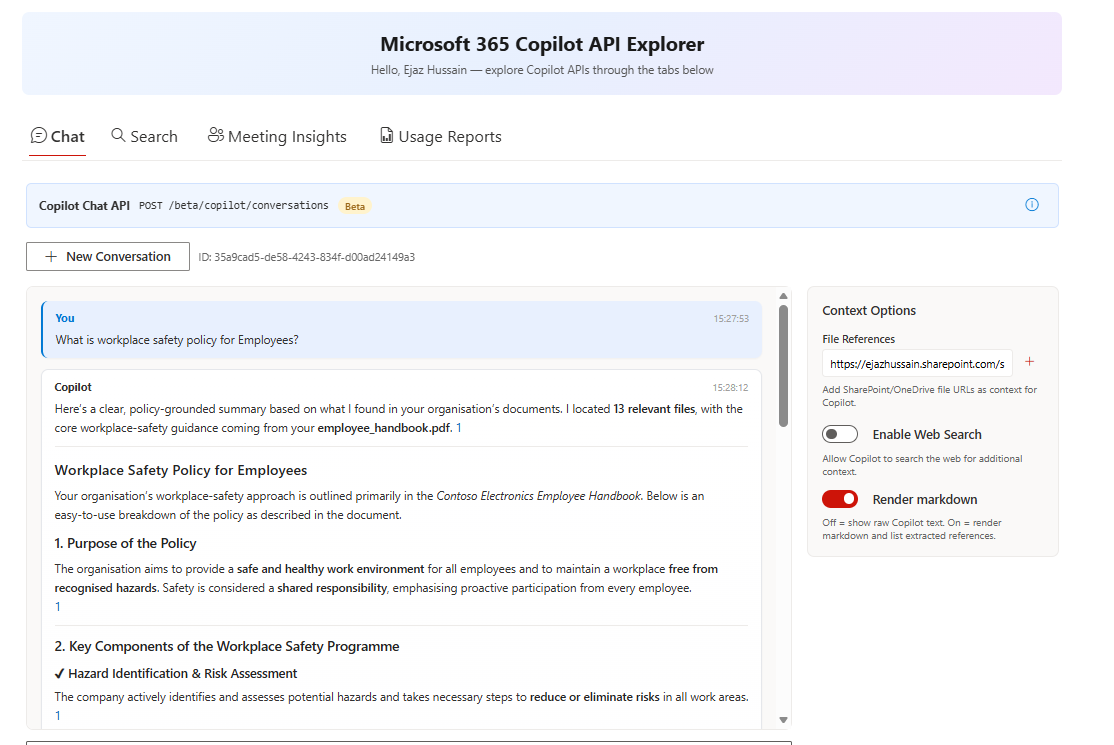
The Chat API (preview) lets you embed Microsoft 365 Copilot’s conversational capabilities directly into your custom applications. Users get intelligent, context-aware conversations grounded in their Microsoft 365 data — without leaving your app.
When to Use It
- Enterprise portals — add AI chat to internal knowledge portals
- LOB apps — embed conversational AI in line-of-business applications
- Mobile apps — bring Copilot to custom mobile experiences
Prerequisites & Permissions
Prerequisites
Microsoft 365 Copilot license and an Azure AD app registration. The Chat API inherits permissions from the data sources being accessed.
| Data Source | Required Permissions |
|---|---|
| OneDrive/SharePoint | Files.Read.All, Sites.Read.All |
| Copilot Connectors | ExternalItem.Read.All |
| Web Search | None (included by default) |
Implementation
import { MSGraphClientFactory, MSGraphClientV3 } from "@microsoft/sp-http"; |
Source Code
For a full chat interface with conversation history, file attachments, and markdown rendering, see the CopilotChatTab in our SPFx sample.
Limitations & Tips
- This is a beta API — endpoints and response shapes may change
- Each conversation maintains context — no need to resend previous messages
- Responses are grounded in the user’s Microsoft 365 data (respects existing permissions)
- Web search results are included by default alongside organizational data
- Handle long-running responses gracefully — AI generation can take several seconds
6. Usage Reports API — Tracking Copilot Adoption 📊
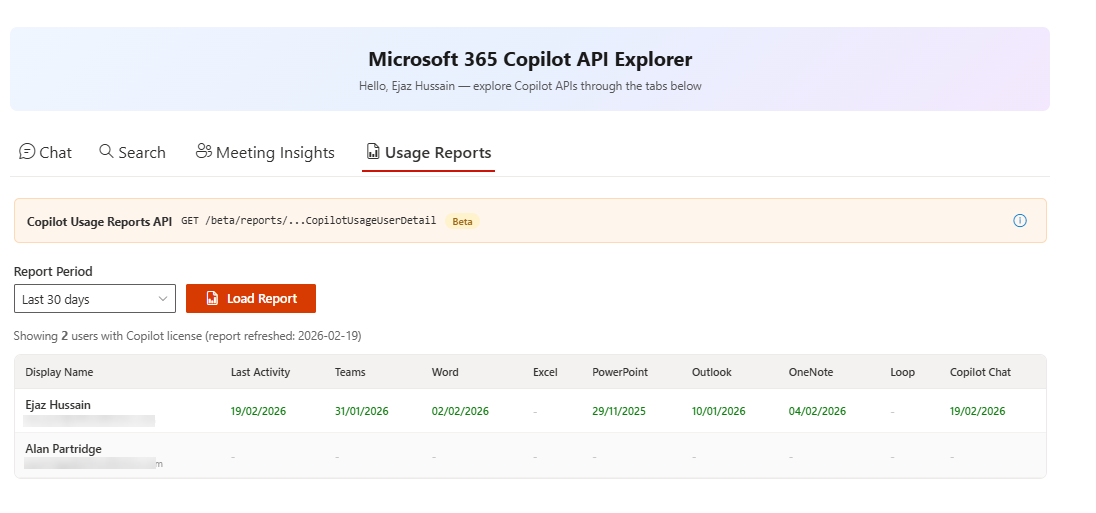
Rolling out Copilot across your organization is one thing — knowing whether people are actually using it is another. The Usage Reports API gives you per-user Copilot activity data across Teams, Word, Excel, PowerPoint, Outlook, OneNote, Loop, and Copilot Chat.
This is the API that answers the question every IT leader asks: “Are we getting value from our Copilot investment?”
When to Use It
- Adoption dashboards — track which teams and users are actively using Copilot
- License optimization — identify unused licenses and reallocate them
- ROI reporting — demonstrate Copilot value to leadership with real usage data
Prerequisites & Permissions
Prerequisites
Microsoft 365 Copilot license. The caller must have an admin role such as Global Reader, Reports Reader, or Teams Admin.
| Permission | Scope | Purpose |
|---|---|---|
Reports.Read.All |
Delegated, Application | Read usage reports across the tenant |
Implementation
An important detail here — you must set the Accept header to application/json, otherwise the API returns CSV by default:
import { MSGraphClientFactory, MSGraphClientV3 } from "@microsoft/sp-http"; |
Source Code
For a complete React component with period selection and a data grid, see the UsageReportsTab in our SPFx sample.
Limitations & Tips
- This is a beta API — response shape may change
- Only returns data for users with a Copilot license
- Requires admin-level permissions (
Reports.Read.All) - Available periods:
D7,D30,D90,D180 - If you forget the
Accept: application/jsonheader, you’ll get CSV back instead of JSON
Putting It All Together 🧩
Which API Should You Start With?
| Your Goal | Start Here |
|---|---|
| Building a RAG app or knowledge assistant | Retrieval API |
| Natural language search experience | Search API |
| Automating meeting follow-ups | Meeting Insights API |
| Compliance monitoring or audit logging | Change Notifications API |
| Tracking Copilot adoption & license ROI | Usage Reports API |
| Embedding conversational AI in your app | Chat API |
Error Handling Pattern — Reusable Retry Helper
All Copilot APIs share common error patterns. Here’s a reusable retry helper we use across our projects:
async function callWithRetry( |
Key Things to Remember
Important Note
1. All Copilot APIs require a Microsoft 365 Copilot license — there's no way around this
2. Rate limits are 200 requests/user/hour for Retrieval and Search APIs
3. Start with Graph Explorer to test your queries before writing code
4. Use delegated permissions where possible — they're easier to manage in SPFx
5. Handle 429 responses with exponential backoff — Copilot APIs will throttle aggressively
Conclusion
Microsoft 365 Copilot APIs give us something we haven’t had before — a way to embed production-grade AI into our applications without building the entire AI stack ourselves. Whether it’s grounding a RAG app with the Retrieval API, building natural language search with the Search API, or automating meeting follow-ups with Meeting Insights, each API solves a real problem that developers face today.
I’ve been building with these APIs hands-on, and the Copilot API Explorer sample is my way of sharing what I’ve learned with the community. If you’re getting started, clone the sample, configure the permissions, and start experimenting.
The APIs are evolving fast — SharePoint support for Search, new Chat API capabilities, and more notification filters are all on the horizon. Now is the time to start building.